

Runner

English · 简体中文
Where terminal agents work together.
Claude Code, Codex, Antigravity CLI, Copilot CLI and pi on the same task, in one mission. Each agent keeps its own TUI in a real terminal; Runner is what sits between them.
Official website · Download Runner
Features · Demo · Agents · CLI · Crew example · Contributing
Alpha · Native macOS (Apple Silicon) and Windows (x64).
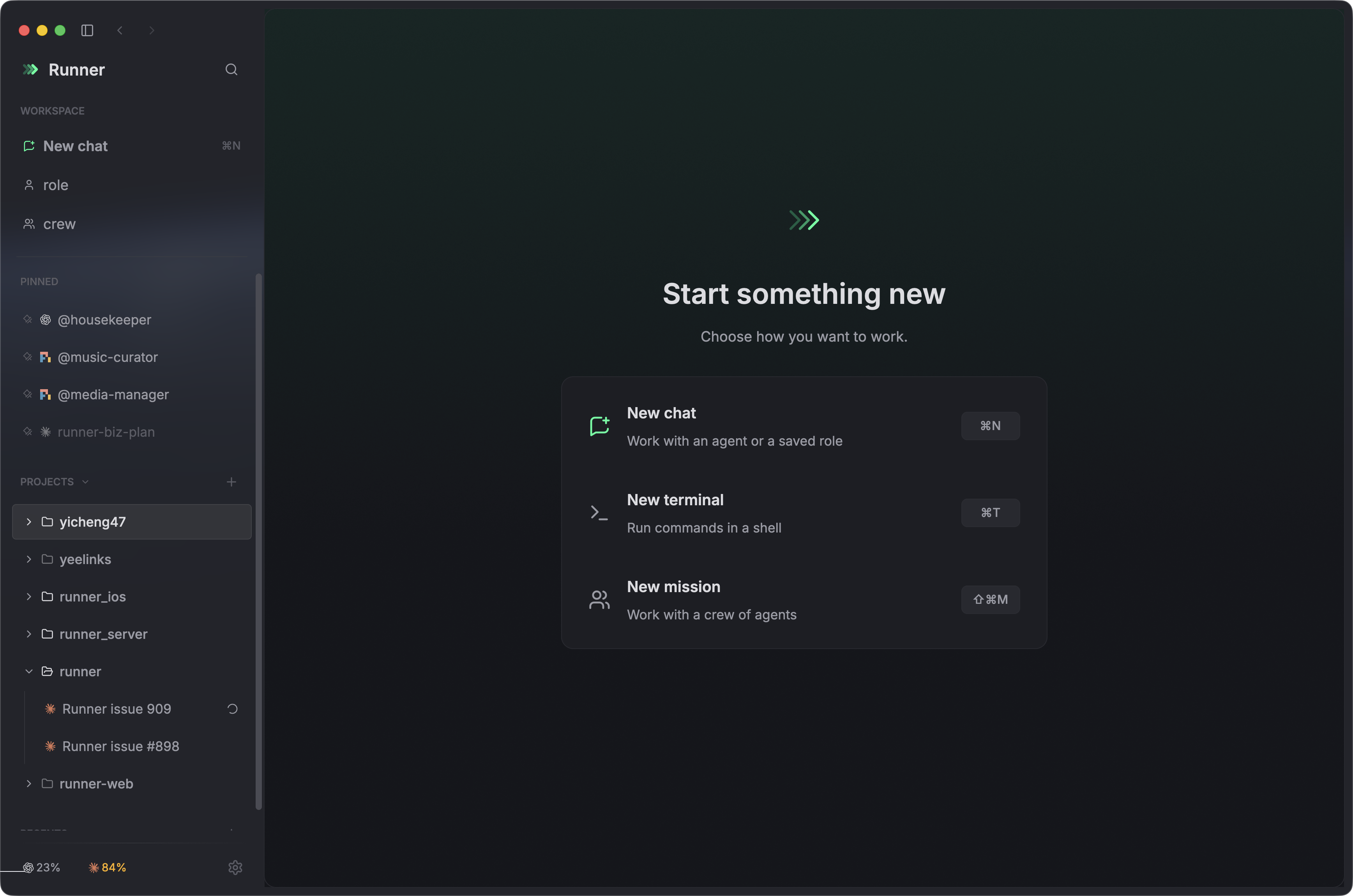
Runner brings CLI coding agents together in reusable crews, with real terminals and a shared mission feed. Your sessions and history stay on your machine.
Features

|
Reusable crewsCompose saved roles into a crew, choose a lead, and define shared team conventions. Review each slot's agent and model, adjust overrides, then launch a mission with the same team whenever you need it. |

|
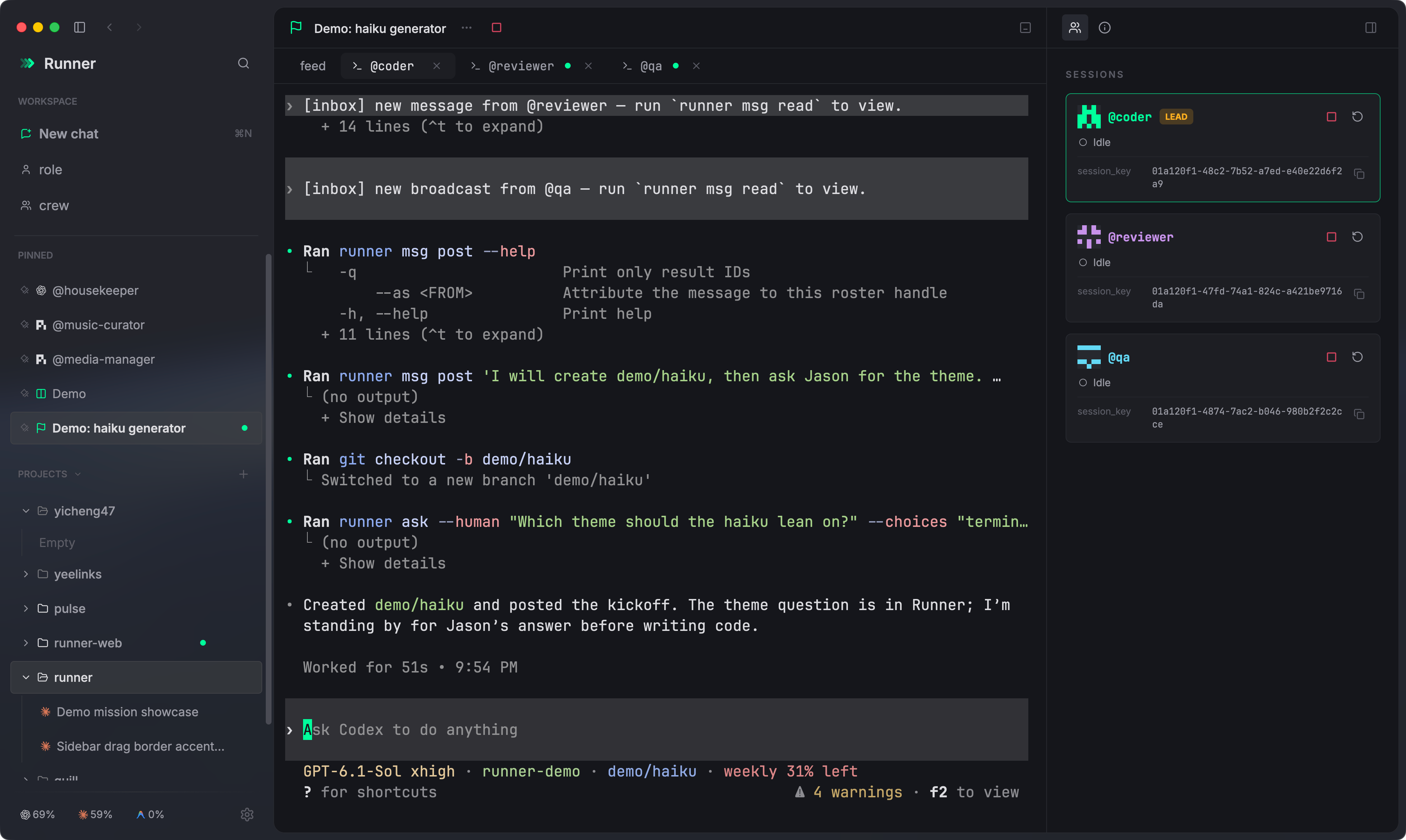
Missions and coordinationEach mission gives every crew slot a live terminal and a shared feed where agents coordinate and bring questions to you. Stop, resume or restart one slot without touching the rest. Architecture → |
|
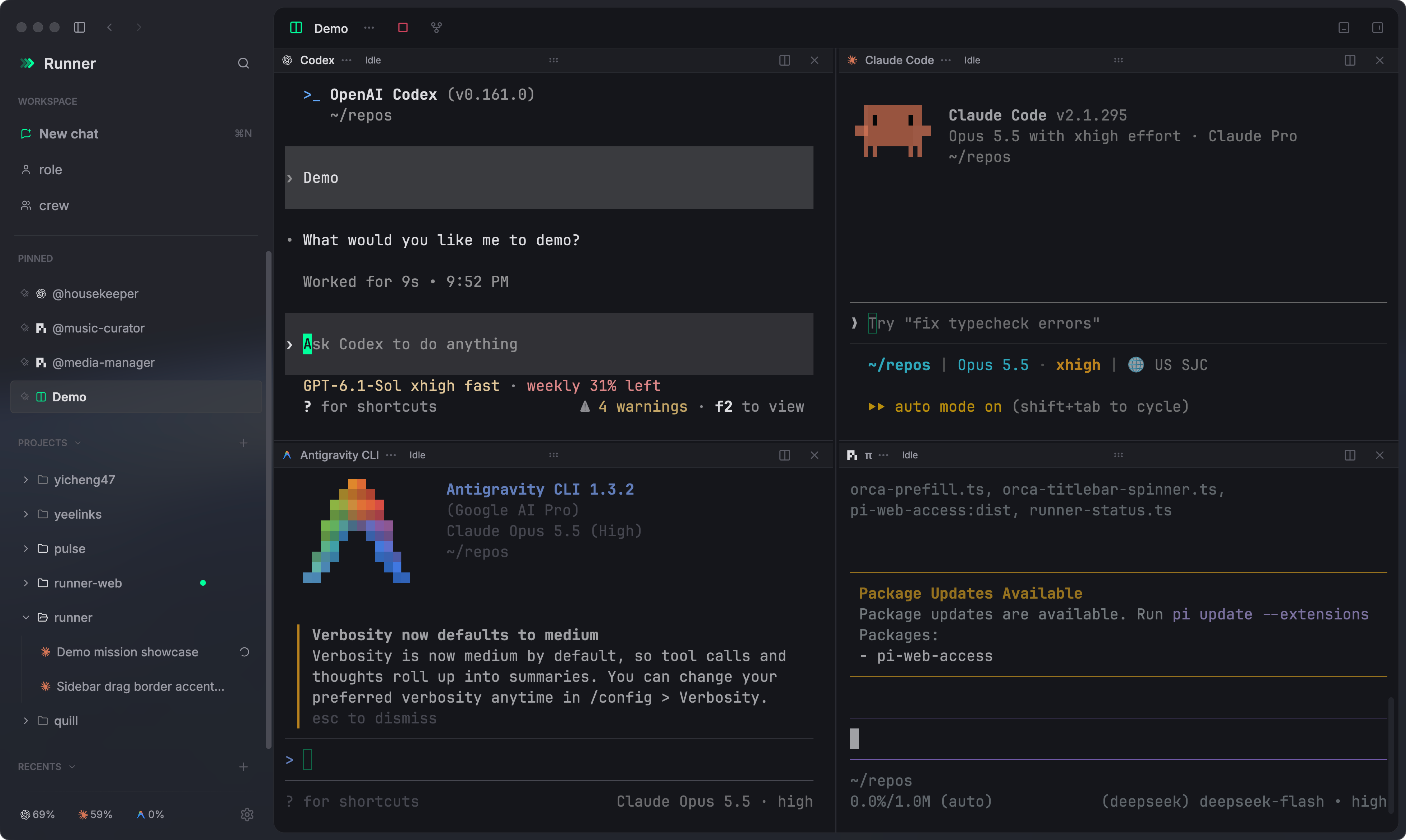
Real terminalsEach agent keeps its own TUI in a real PTY on a GPU-drawn |
|
Split tabs and windowsSplit a tab as far as the window allows, drag panes to reorder, group tabs into folders, and open more windows with |
|
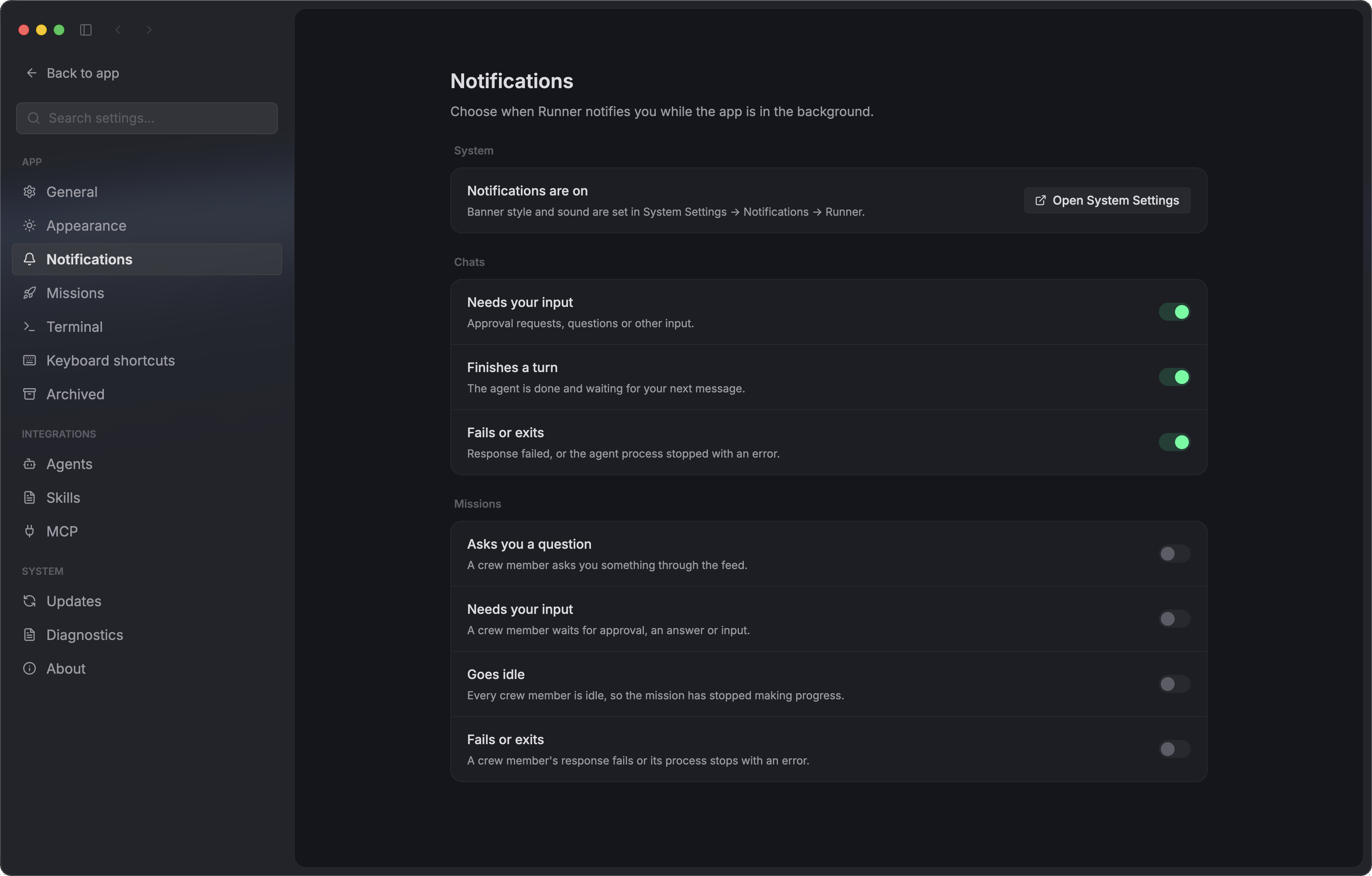
Desktop notificationsWhile Runner is in the background, get notified when an agent needs input, finishes a turn or fails. Clicking a notification opens its chat or mission. Choose events in Settings → Notifications; chat notifications are on by default, and mission notifications are opt-in. |
Also included:
- Agents keep working when Runner is closed — Sessions live in
runnerd, Runner's background service. Quit the app, or let it crash, and reopen it to the same live terminals; stopped agents resume their own conversations on the next launch. - MCP servers and skills in one place — Settings → MCP and Settings → Skills list each agent's own config and switch entries off per agent, changing only the entry you touched.
- Projects — Bind a working directory once; chats and missions started in it inherit the cwd and group in the sidebar.
- Light and dark — Carbon and Runner Light, plus Catppuccin, with an app palette and a terminal palette per mode. Claude Code follows the switch live.
Demo
A quick tour of reusable roles, crew setup, split terminals, and coder/reviewer/QA coordination in a live mission.
demo-compressed.mp4
Prerequisites
Runner runs the agent CLIs you already use; it does not install them. Install and sign in to at least one of Claude Code, Codex, Antigravity CLI, GitHub Copilot CLI or pi before you start, and Runner finds it on your PATH. On Windows, Claude Code and pi's bash tool need Git for Windows, and npm-installed CLIs need Node.js.
Drive Runner from your agents
Everything in Runner is also a runner command, so your agents, your scripts and you at a terminal can drive it. Your daily agent can plan a fix, hand it to a coder-and-reviewer crew, and keep working, while every session it started is still a real terminal you can open and watch.
A whole mission, driven from outside the app:
mission=$(runner mission start --crew <crew> --goal-file - -q < brief.md)
runner mission feed "$mission" --follow                   # the crew's messages as they arrive
runner msg post --mission "$mission" --to <lead> "message"
runner mission answer "$mission" <question_id> <choice>   # answer a question the crew asked you
runner mission stop "$mission"
| Commands | What they do |
|---|---|
runner mission |
Start, follow, answer, stop, resume and archive missions |
runner crew, runner role, runner project |
Create and edit crews, roles and projects |
runner chat start, runner session |
Start a chat; stop, resume, restart or archive any session |
runner msg, runner signal, runner ask |
How crew members talk to each other inside a mission |
runner status, runner daemon |
Check and stop Runner's background service |
runner help lists every command. Add --json for machine-readable output, which is what agents use. Commands start the background service when it is not running, so they work with the app closed.
Setup. On macOS, the first launch installs runner to ~/.local/bin, or a writable /usr/local/bin, when that directory is already on the login PATH; otherwise it is one click in Settings → General → Command line. On Windows, Runner adds it to the user PATH. Agents need nothing: Runner installs a runner skill for every detected agent that points it at the version-matched runner help agents guide, and the Runner skill for agents switch in the same settings section turns that off.
Supported agents
| Codex | Claude Code | Antigravity CLI | pi | GitHub Copilot CLI | Cursor | Grok | |
|---|---|---|---|---|---|---|---|
| Chats, missions, resume after relaunch | ✓ | ✓ | ✓ | ✓ | ✓ | ✓ | macOS ⁵ |
| In-session conversation change updates Runner's resume key | ✓ | ✓ | ✓ | ✓ | — | macOS/Linux only | macOS/Linux only ⁴ |
| Runs on Windows | ✓ | ✓ | ✓ ¹ | ✓ ² | ✓ | — ³ | — ³ |
| Fork a chat | ✓ | ✓ | — | ✓ | — | — | ✓ |
| Working / Idle from the agent's hooks | ✓ | ✓ | macOS only | ✓ | ✓ | — (terminal baseline) | macOS/Linux only |
| Needs you: approval and question dialogs shown | — | ✓ | — | from extensions only | ✓ | — | approval only (macOS/Linux) |
| Model list read from the CLI | ✓ | ✓ | ✓ | ✓ | — | ✓ | ✓ |
| Update from Settings → Agents | ✓ | ✓ | — | ✓ | ✓ | — | — |
| Weekly usage pill and detailed popover | ✓ | ✓ | ✓ | — | — | — | — |
| Mission access | Bypass | Bypass | Bypass | trusted workspace | Bypass | Bypass | Bypass |
| Skills pane | catalog + on/off | catalog + on/off | catalog | catalog | catalog + on/off | catalog | catalog |
| Runner skill installed | ✓ | ✓ | ✓ | ✓ | ✓ | ✓ | ✓ |
| Terminal rendering covered by fixtures | ✓ | ✓ | ✓ | — | — | — | ✓ |
¹ Antigravity CLI has not been smoke-tested on Windows yet. ² pi runs natively on Windows but has not been smoke-tested there yet; its bash tool requires Git for Windows. ³ Cursor and Grok Build have not been verified on Windows yet. ⁴ Switching between already loaded Grok dashboard sessions updates the key on the next prompt; an idle switch has no native hook.
⁵ Grok chats, missions and stop/resume passed native macOS checks; full app-relaunch persistence remains unverified.
OpenCode v2 is enabled by default and has been tested in Runner. It supports native PTY chats, roles and crews, exact session IDs, dynamic models, skills and MCP settings; see the OpenCode spec and focused validation. Fork, usage/quota and update controls are unavailable.
Claude Code, Codex and Antigravity CLI are the primary agents. Claude Code and Codex have tuned launch and nudge timing. GitHub Copilot CLI needs a Copilot subscription. pi brings your own configured model provider. Antigravity CLI signs in with a Google account and updates itself when it starts, so it has no Update button. Cursor is enabled by default; see the Cursor spec for its current capabilities. Grok Build uses your existing grok.com sign-in, updates itself, and is enabled by default; see the Grok spec and validation record for platform evidence. TRAE CLI is available as an opt-in runtime in Settings → Agents. Issues are welcome.
Runner detects each CLI on PATH, with a per-agent executable override in Settings → Agents, which also shows each CLI's version and, when a newer one is published, an Update button that runs the CLI's own updater in a terminal. PowerShell 7 is optional on Windows. Agents run natively on Windows, without WSL.
Example crew
The default Runner shape is a two-role pair-coding loop: one implements, one reviews, and the loop runs on the working-tree diff until the review is clean — no architect, no dispatch overhead, just the tightest loop that still has a second pair of eyes. Runner seeds this crew on first launch; the source lives in examples/pair-coding/.
| Role | Runtime | Responsibility | System prompt |
|---|---|---|---|
| @coder (lead) | codex |
Branches, implements, runs the checks, hands the diff to the reviewer, fixes findings. | coder.md |
| @reviewer | codex |
Reads the working-tree diff, reports must-fix issues with file:line pointers, never edits code. | reviewer.md |
The crew's team conventions — feature branch first, review before any commit, nothing merged unless the human asks — are in team-conventions.md. Both slots ship on codex; switching @coder to claude-code makes it a cross-vendor pair, where each model catches what the other's training glosses over.
More crews
For weirder, more fun crew shapes, peek at examples/:
pair-coding/— the default coder / reviewer pair abovecodex-trio/— the pair above plus a QA slot that builds the reviewed revision and tests it in the live appdev-crew/— an architect / impl / reviewer trio: one decomposes, one builds, one auditsdocs-crew/— architect partitions a complex repo, 2+ writers draft per-module docs in parallel, editor harmonizestic-tac-toe/— 2 agents + 1 referee actually playing a game against each otherwerewolf/— 6-player social deduction with a god moderatortomb-raid/— a 4-person heist crew run by a DM
Each is a copy-pasteable handle + system-prompt set you can spawn into a new Crew and hit Start.
Community
- Bugs and feature requests: GitHub Issues.
- Thanks to LINUX DO for providing a community for discussion and sharing open-source projects.
- 中文用户可以扫码加入 Runner 微信用户群。群二维码 7 天过期,如果扫码提示失效,请提一个 issue 提醒我更新。

Acknowledgements
- GPUI and gpui-pre — the UI uses a crates.io snapshot of Zed's GPU-accelerated UI framework. Thank you to the Zed team for building and open-sourcing GPUI, and to gpui-kit and Jason Lee (huacnlee) for publishing gpui-pre; Zed's terminal crates were the architectural reference for Runner's terminal split.
- alacritty_terminal — the terminal grid, parser, and scrollback under every pane.
- xterm.js — the procedural box-drawing glyph table is transcribed from the WebGL addon under its MIT notice (
crates/runner-app/LICENSE.xterm). - Windows Terminal ConPTY — Windows builds bundle Microsoft's
conpty.dllandOpenConsole.exeunder the MIT notice (crates/runner-app/LICENSE.conpty). - Sparkle — the macOS updater.
Author
Runner is written and maintained by Yicheng Wang (Jason Wang, 王逸成) — @yicheng47 on GitHub.
License
MIT. Copyright (c) 2026 Yicheng Wang (Jason Wang). You can use, modify, and redistribute Runner for anything, including at work and inside closed-source products, as long as you keep the copyright notice (see LICENSE). Versions released from 2026-08-22 through 2026-09-22 were published under GPL-3.0-only and remain available under that license.