
FerroUI

FerroUI is a cross-platform UI framework for Rust: a retained-mode control library with a styled property system, data binding, XAML markup, control themes and a composition-based renderer. It is a port of the Avalonia UI framework to Rust that keeps the original architecture, contracts and behaviour, so that applications, themes and markup written against that model carry over with their structure intact.
Status: 0.3.0.
0.3.0, which adds ports of Rx, DynamicData and ReactiveUI for MVVM applications (docs/mvvm.md), is published on crates.io (CHANGELOG.md). Every upstream file and member in scope is ported or waived with a recorded reason. The framework runs on macOS, Windows, Linux (X11, Wayland and the framebuffer), iOS, Android and in the browser. It was verified in continuous integration, in virtual machines, in the iOS simulator and on the Android emulator, not on a range of real devices. Within 0.3 the public API is kept; 0.4.0 may change it. See Project status.

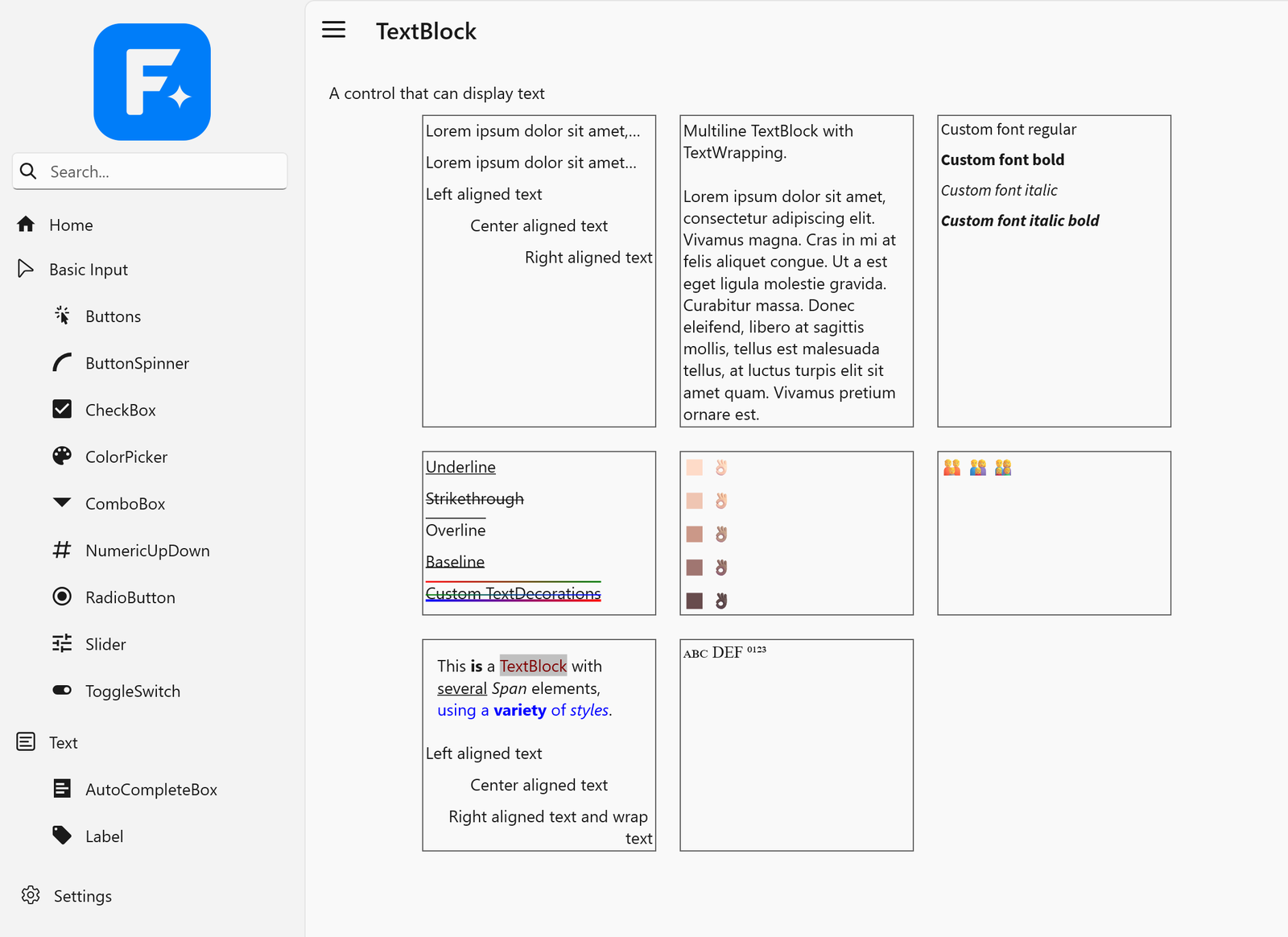
The ControlCatalog sample with the WinUI 3 theme (ferroui-themes-winui), its default theme, on Windows 11 with the Mica backdrop. Text is shaped with HarfBuzz and drawn by Skia with the platform's text rendering settings: the contrast and gamma of ClearType on Windows, greyscale antialiasing on a high-density display, and colour emoji (docs/porting/text-rendering.md).
| Text on Windows | The same catalog on macOS |
|---|---|
 |
 |
Highlights
- Complete object model. Styled and direct properties with value priorities, inheritance, coercion and change notification; logical and visual trees; routed events; layout; input, focus and gestures.
- Styling and theming. Selectors, styles, control themes, resources, theme variants and transitions. The Fluent, Simple and WinUI 3 themes are included.
- Data binding. Compiled and reflection-style binding paths, converters, multi-bindings, data validation and templates.
- XAML. A port of the XamlX compiler front end with the framework's transformers and markup extensions. Documents are compiled to Rust source by the build script of a crate, or loaded at run time.
- Composition renderer. A compositor with a render loop on its own thread, dirty-region tracking, server-side visuals and composition animations, drawing through a backend-neutral drawing context.
- Swappable backends. Rendering and windowing sit behind contracts. Skia renders through Graphite on Metal, Ganesh on OpenGL, ANGLE, WebGL and Vulkan, or in software; an experimental Vello backend sits behind the same contracts; HarfBuzz shapes text.
- Safe Rust. The controls, markup, XAML and theme crates contain no
unsafecode. It is confined to a small part of the object model core and to the rendering, text shaping, platform and interop backends.
Project status
The state per subsystem is tracked in docs/porting/CRITICAL-PATH.md, the state per upstream member in docs/porting/TRACKING.md, the upstream test suites per project in docs/porting/TESTS.md, and what is not ported in docs/porting/REMAINING.md. The checks that still need real hardware or a person at the screen are listed in docs/porting/manual-verification.md. Of the upstream projects in scope, every member has a counterpart or is waived with a reason (30354 present, 5856 waived, none missing); of every upstream project, in scope or not, the port has 81 percent of the members.
Framework
| Area | State |
|---|---|
| Property system, trees, layout, input, styling, resources | Ported, with the upstream test suites |
| Data binding, animation, transitions | Ported |
| Media, text layout, fonts | Ported |
| Compositor and render loop | Ported, including composition animations, custom visuals and the import of external GPU objects; the render loop runs on its own thread on the desktop |
| Controls | The control set, including items controls, text input, menus, pickers, calendar, pages, the colour picker, the managed dialogs and automation peers |
| XAML | The run-time loader with the upstream test suites, and compilation of markup to Rust source in build scripts (used by the themes, the dialogs and the ControlCatalog sample); hot reload and parts of the build integration are open |
| Themes | Fluent, Simple and WinUI 3, for every control (WinUI 3: progress, deviations, comparison with native WinUI 3) |
| Skia and HarfBuzz backends | Ported; Skia is the default and reference renderer |
| Vello backend | Experimental: CPU, hybrid and GPU modes, measured against Skia; open work in vello-backend.md, section 13 |
Platforms
| Platform | What works | Verified |
|---|---|---|
| macOS | Windows, input, input methods, clipboard, drag and drop, menus, tray icon, storage pickers, native control host, accessibility; Metal (default), OpenGL (with Skia built with --cfg ferro_skia_apple_ganesh) and software rendering |
CI and the development machine; the storage pickers and a screen reader not exercised |
| Windows | Windows, input, input methods and the input pane, clipboard and drag and drop over OLE, file dialogs, tray icon, native control host, extended client area, UI Automation; rendering in software, through ANGLE, WGL, DirectComposition, Windows.UI.Composition (with blur, acrylic and Mica) and a DXGI swap chain; Vulkan behind the feature vulkan |
CI (x64 and ARM64) and a Windows 11 ARM64 virtual machine; screen readers and the look of acrylic and Mica on a real desktop not verified |
WinUI 3 hosting (ferroui-winui) |
The content in a swap chain panel of a WinUI 3 window, with input, text input, cursors, drag and drop and automation | The smoke run of its sample (rendering, the automation tree, closing) in a virtual machine; input, drag and drop and a UI Automation client not verified |
| Linux, X11 | Windows, input, input methods (XIM, IBus, Fcitx), clipboard, drag and drop, desktop portals, GTK file dialogs, menus and tray icon over D-Bus, session management, native control host, accessibility over AT-SPI; rendering in software, through GLX, EGL and Vulkan | CI under Xvfb and an Ubuntu virtual machine; no screen reader |
| Linux, Wayland | Opt-in, as upstream (platform detection chooses X11): toplevels with server-side or drawn decorations, popups, pointer, keyboard, touch and text input, clipboard and drag and drop, fractional scaling; rendering through shared memory, EGL or a dmabuf swap chain | CI under headless sway and a virtual machine (sway, headless Mutter); a desktop compositor with input and the dmabuf swap chain on a GPU not verified |
| Linux framebuffer | One full-screen view on /dev/fb0 (software) or on a KMS output (OpenGL through EGL on GBM), with input through libinput or the event devices |
Virtual devices only (vkms, uinput) in CI and a virtual machine; not on a board |
| iOS | A view over Metal or OpenGL ES, touch, keyboard and text input, clipboard, storage, native control host, accessibility | The simulator; no signed device build, no VoiceOver |
| Android | A view over EGL, software or Vulkan (feature vulkan), touch, keyboard and the input method, lifecycle, clipboard, storage, native control host, accessibility; builds with stable Rust |
The emulator (API 36); no device, no TalkBack |
| Browser (WebAssembly) | A view in a web page, rendered with WebGL 2 or a 2D canvas, input, clipboard, storage, native control host; an opt-in build renders from a worker thread | Headless Chrome in CI; other browsers not verified |
| Headless | Windows without a screen for tests, and a VNC server (ferroui-headless-vnc) to see and drive an application remotely |
Tests; the VNC server with a test client, not with real viewers |
Requirements
- Rust 1.89 or later (the browser needs 1.93 or later).
- Python 3 for the maintenance scripts (not needed to build).
- The first build downloads a prebuilt Skia for the target, or builds it from source where no prebuilt binary matches (Vulkan on Windows), and builds HarfBuzz from source with a C++ compiler; it can take a while.
Per platform:
| Platform | Needs | Details |
|---|---|---|
| macOS | macOS 11 or later and the Xcode command line tools (the platform compiles an Objective-C++ library) | apple-opengl.md for the OpenGL configuration |
| Windows | x64 or ARM64, the MSVC build tools; libclang for ANGLE (the default feature angle); the feature vulkan builds Skia from source. Hosting in WinUI 3 needs the Windows App SDK 1.6 runtime and its bootstrap library beside the executable |
win32-platform.md, winui.md |
| Linux | The development packages of fontconfig and FreeType; the system libraries (Xlib, GTK, GLib, EGL, Vulkan, libwayland-client, libxkbcommon, libinput, libdrm, libgbm) are opened at run time, none is linked |
x11-platform.md, wayland-platform.md, linux-framebuffer-platform.md |
| iOS | Xcode with the iOS SDK and the targets aarch64-apple-ios and aarch64-apple-ios-sim; an application is bundled without an Xcode project (scripts/ios/bundle.sh) |
ios-platform.md |
| Android | The Android SDK and NDK, stable Rust with the target aarch64-linux-android, API level 26 or later; packaged without Gradle (scripts/android/apk.sh) |
android-platform.md |
| Browser | The target wasm32-unknown-emscripten, Emscripten and the pinned wasm-bindgen command-line tool (scripts/browser/setup.sh installs them); the opt-in build with threads also needs the pinned nightly toolchain |
browser-platform.md |
Installation
FerroUI is a set of crates that are released together at one version. A desktop application names the base library, the controls, the desktop entry point and a theme:
[dependencies]
ferroui-base = "=0.3.0"
ferroui-controls = "=0.3.0"
ferroui-desktop = "=0.3.0"
ferroui-themes-fluent = "=0.3.0"
The WinUI 3 theme is the crate ferroui-themes-winui (WinUITheme), used in place of ferroui-themes-fluent or beside it; the facade crate has it as the feature winui-theme.
An application can also name one dependency instead: the facade crate ferroui. It re-exports the common crates under short names (ferroui::base, ferroui::controls, ...) with a prelude of the types of a minimal application; its default features are the desktop platforms and the Fluent theme, and further features add the Simple theme, XAML loading at run time, the colour picker, the TreeDataGrid, the dialogs, the browser platform, the WinUI 3 theme, the Vello backend, the headless platform and the graphics contracts (docs/release.md, section 2.1). In the repository it is used already: cargo run -p ferroui --example hello.
The libraries for MVVM applications (Rx, DynamicData, ReactiveUI and their integration with the controls) are crates of the release as well: ferroui-reactiveui-controls = "=0.3.0" beside the crates above, or the facade crate with its feature reactiveui (docs/mvvm.md).
The crates of a release depend on one another at exactly its version, so name the same version for every FerroUI crate, as above. 0.1.0 followed four previews (0.1.0-preview.1 to 0.1.0-preview.4), pre-releases in the sense of semantic versioning, which Cargo selects only when they are named, 0.2.0 and 0.3.0 are the next minor versions, and 0.3.0 followed one preview (0.3.0-preview.1). The work towards the next one is published as previews of it (0.4.0-preview.1, ...), which may change any part of the public API. The release process is described in docs/release.md and the changes of each release in CHANGELOG.md.
The platforms that are not part of platform detection are named by their own crates beside the others: ferroui-wayland, ferroui-linuxframebuffer, ferroui-ios, ferroui-android, ferroui-browser, ferroui-winui and ferroui-headless-vnc.
Markup is loaded at run time with ferroui-markup-xaml-loader (the feature xaml of the facade), or compiled by the build script of the application with ferroui-build (a build dependency) against ferroui-markup-xaml. The code the markup compiler writes names the crates it calls by their own names, so an application that compiles its markup depends on those crates directly, beside or instead of the facade.
Crates
Core
| Crate | Description | Version | Downloads | Documentation |
|---|---|---|---|---|
ferroui-system |
The parts of the .NET base class library that FerroUI and its reusable libraries share: thread-local variables for every target, events, property and collection change notification, cancellation | |||
ferroui-base |
The base library of FerroUI: the property system, layout, input, styling, media, text, animation, data binding and the compositor | |||
ferroui-reactive |
A port of Rx.NET (System.Reactive) for FerroUI: observable sequences, their operators, schedulers, disposables and subjects, independent of the user interface | |||
ferroui-dynamic-data |
A port of DynamicData for FerroUI: reactive collections, change sets, observable caches and lists with their operators, independent of the user interface | |||
ferroui-reactive-testing |
A port of Microsoft.Reactive.Testing for ferroui-reactive: the virtual-time test scheduler, recorded notifications, hot and cold test observables and their assertions | |||
ferroui-splat |
A port of Splat for FerroUI: the service locator with its dependency resolvers, logging, mode detection, feature usage tracking and the application builder, independent of the user interface | |||
ferroui-reactiveui |
A port of ReactiveUI for FerroUI, in its System.Reactive flavour with the run time of ReactiveUI.Binding: reactive objects, commands, property observation, bindings, view location, activation and routing for MVVM, independent of the user interface | |||
ferroui-reactiveui-testing |
A port of ReactiveUI.Testing for ferroui-reactiveui: running code with test schedulers, the builders of test data and the helpers of tests of view models | |||
ferroui |
FerroUI in one dependency: the facade crate that re-exports the common crates under short names, with a prelude and features that choose the platform, the theme and the backends |
Controls and themes
| Crate | Description | Version | Downloads | Documentation |
|---|---|---|---|---|
ferroui-controls |
The controls of FerroUI: the application model, top levels, the control set and automation peers | |||
ferroui-fonts-inter |
The Inter font family as an embedded font collection of FerroUI | |||
ferroui-reactiveui-controls |
The integration of ReactiveUI with FerroUI: the scheduler of the dispatcher, property observation and command binding for FerroUI objects, activation, the reactive views and view hosts, the data-template hook, suspension and use_reactive_ui on the application builder | |||
ferroui-treedatagrid-core |
The framework-neutral part of FerroUI's TreeDataGrid: flat and hierarchical sources, columns, rows, sorting, expansion, and row and cell selection | |||
ferroui-dialogs |
The managed dialogs of FerroUI: the managed file chooser, the managed storage provider and the about dialog | |||
ferroui-themes-fluent |
The FerroUI Fluent theme: control themes, colour palettes and resources for the control set, in light and dark variants | |||
ferroui-controls-treedatagrid |
The TreeDataGrid control of FerroUI: hierarchical and tabular data in one virtualizing view, with sorting, selection, editing, drag and drop and its control themes | |||
ferroui-themes-simple |
The FerroUI Simple theme: control themes and resources for the control set, in light and dark variants | |||
ferroui-controls-color-picker |
The colour picker library of FerroUI: ColorPicker, ColorView, ColorSpectrum, ColorSlider, ColorPreviewer, the colour palettes and their control themes | |||
ferroui-themes-winui |
The FerroUI WinUI theme: the control styles, templates and theme resources of WinUI 3, in light, dark and high contrast variants |
Markup and build
| Crate | Description | Version | Downloads | Documentation |
|---|---|---|---|---|
ferroui-build-scan |
The build-time type model of FerroUI and the source scanner that fills it: what a build script exports of a crate, linking nothing of the framework | |||
ferroui-markup |
The markup support of FerroUI: binding path parsing and reflection-style bindings | |||
ferroui-markup-xaml |
The FerroUI XAML runtime library: markup extensions, templates, includes, converters and the runtime helpers of compiled XAML | |||
xamlx |
Rust port of the backend-independent part of XamlX (XAML compiler library) | |||
ferroui-markup-xaml-loader |
The FerroUI XAML language definition and compiler extensions built on xamlx | |||
ferroui-build |
Build-script support of FerroUI: compiles the markup documents of a crate to Rust source and embeds its assets |
Render backends and text
| Crate | Description | Version | Downloads | Documentation |
|---|---|---|---|---|
ferroui-harfbuzz |
The HarfBuzz text shaping backend of FerroUI | |||
ferroui-metal |
The Metal platform contracts of FerroUI: the device, the surface of a top-level and the import of external objects | |||
ferroui-opengl |
The OpenGL platform contracts of FerroUI: contexts, surfaces and the entry points the framework itself uses | |||
ferroui-vulkan |
The Vulkan platform contracts of FerroUI: the instance, the device, the graphics context, the swap chain render target of a surface and the import of external objects | |||
ferroui-skia |
The Skia render backend of FerroUI: Graphite on Metal, Ganesh on WebGL and raster | |||
ferroui-vello |
The Vello render backend: the render contracts of the base library on kurbo, peniko and the renderers of the Vello project |
Platforms
| Crate | Description | Version | Downloads | Documentation |
|---|---|---|---|---|
ferroui-microcom |
The COM-style interop runtime of FerroUI, which its native platform backend is built on | |||
ferroui-freedesktop |
The FreeDesktop services of FerroUI for Linux desktops: D-Bus input methods, portals, menus, tray icons and accessibility over AT-SPI | |||
ferroui-android |
The Android platform of FerroUI: a view in an activity, rendered through EGL or to the native window | |||
ferroui-native |
The macOS platform of FerroUI: windows, input, clipboard, drag and drop, menus and Metal and OpenGL graphics over a native library | |||
ferroui-headless |
The headless platform of FerroUI: windows without a screen, driven by simulated input, for tests | |||
ferroui-headless-vnc |
The VNC server of the headless platform of FerroUI: an application runs without a screen and is seen and driven through a VNC viewer | |||
ferroui-ios |
The iOS platform of FerroUI: a UIKit view, touch input and Metal and OpenGL ES graphics | |||
ferroui-linuxframebuffer |
The Linux framebuffer platform of FerroUI: one full-screen top-level on a framebuffer device or a KMS output, with input from the kernel's input devices | |||
ferroui-browser |
The browser platform of FerroUI: a top-level in an element of a web page, rendered with WebGL or to a 2D canvas | |||
ferroui-win32 |
The Windows platform backend: windows, the message loop, input, screens and the software surface over the Win32 API | |||
ferroui-winui |
FerroUI content inside a WinUI 3 (Windows App SDK) application: a swap chain panel with pointer, keyboard and text input, cursors, drag and drop and automation | |||
ferroui-x11 |
The X11 windowing platform of FerroUI for Linux | |||
ferroui-desktop |
The desktop entry point of FerroUI: platform detection with the default render and text shaping backends | |||
ferroui-wayland |
The Wayland platform of FerroUI for Linux: toplevels and popups over xdg-shell, pointer, keyboard, touch and text input, clipboard and drag and drop, rendered through shared memory, EGL or a dmabuf swap chain |
Tools and designer support
| Crate | Description | Version | Downloads | Documentation |
|---|---|---|---|---|
ferroui-remote-protocol |
The remote protocol of FerroUI: the messages of the previewer and of remote rendering, their BSON serialization and the transports that carry them | |||
microcom-codegen |
Code generator of the FerroUI interop runtime: a C++ header and Rust bindings from an interface definition file | |||
ferroui-designer-support |
Designer support of FerroUI: the loader of the previewed window and the previewer that talks to an IDE over the remote protocol |
Getting started
Clone the repository and build the workspace:
git clone https://github.com/wieslawsoltes/FerroUI.git
cd FerroUI
cargo build --workspace
Run the examples:
# A minimal application through the facade crate and its prelude, with the Fluent theme
cargo run -p ferroui --example hello

# The same with the crates named one by one
cargo run -p ferroui-desktop --example hello_window

# Themed controls, Simple theme (add -- --fluent for the Fluent theme)
cargo run -p ferroui-themes-simple --example themed_window

# The ControlCatalog sample application
cargo run -p control-catalog-desktop

# The TreeDataGrid demo (its pages are also the page TreeDataGrid of the ControlCatalog)
cargo run -p treedatagrid-demo

# ReactiveDemo, the getting-started sample of ReactiveUI: a crates.io browser on the WinUI 3
# theme (add --no-default-features to search an in-memory catalogue instead of crates.io)
cargo run -p reactive-demo

# The example of the ReactiveUI integration, with a DynamicData page, on the WinUI 3 theme
cargo run -p reactiveui-example

# The gallery of the WinUI theme (its capture mode and its comparison with WinUI 3 on Windows:
# docs/porting/winui-theme-gallery.md)
cargo run -p winui-theme-gallery --bin winui-theme-gallery
The ControlCatalog runs on the other platforms too: on Linux it takes the Wayland backend when a compositor is reachable, as the original sample does (FERROUI_CATALOG_WAYLAND=0 keeps X11), on the framebuffer with --fbdev or --drm, and on the headless platform behind a VNC server with --vnc; in the browser through scripts/build-browser.sh control-catalog-browser; on iOS through scripts/ios/sim-catalog.sh and on Android through scripts/android/emu-catalog.sh. The platform documents under docs/porting have the details.
Run the tests:
cargo test --workspaceA minimal application
An application is a class derived from Application that creates its main window when the framework has finished initialising. With the facade crate everything it names comes from ferroui::prelude:
use ferroui::prelude::*;
use std::rc::Rc;

#[repr(C)]
pub struct App {
    base: Application,
}

ferro_class!(App: Application);
ferro_impl_classes!(App: FerroObjectImpl);

impl NewApplication for App {
    fn new_application() -> Ref<Self> {
        instantiate(Self { base: Application::construct() })
    }
}

impl ApplicationImpl for App {
    fn initialize(this: &Self) {
        Self::parent_initialize(this);
        this.styles().add(FluentTheme::new().as_style());
    }

    fn on_framework_initialization_completed(this: &Self) {
        let lifetime = this.application_lifetime();
        if let Some(desktop) =
            lifetime.as_ref().and_then(|lifetime| lifetime.as_classic_desktop_style_application_lifetime())
        {
            desktop.set_main_window(Some(create_main_window()));
        }
        Self::parent_on_framework_initialization_completed(this);
    }
}

fn create_main_window() -> Ref<Window> {
    let text = TextBlock::new();
    text.set_text(Some("Hello from FerroUI"));
    text.set_font_size(24.0);

    let button = Button::new();
    button.set_content(Some(Rc::new("Click me".to_string())));
    button.click(|_, _| println!("Button clicked"));

    let panel = StackPanel::new();
    panel.set_spacing(12.0);
    panel.children().add(text);
    panel.children().add(button);

    let window = Window::new();
    window.set_title(Some("Hello".to_string()));
    window.set_content(Some(Control::boxed(panel)));
    window
}

fn main() -> std::process::ExitCode {
    let args: Vec<String> = std::env::args().skip(1).collect();
    let exit_code = AppBuilder::configure::<App>()
        .use_platform_detect()
        .start_with_classic_desktop_lifetime(&args);
    std::process::ExitCode::from(exit_code as u8)
}
The complete programs are hello.rs (the facade) and hello_window.rs (the crates one by one). The API is still changing; those examples are kept building and are the authoritative reference.
Markup
Views can be written in XAML. FerroUI uses its own XML namespace:
<Window xmlns="https://github.com/ferroui"
        xmlns:x="http://schemas.microsoft.com/winfx/2006/xaml"
        Title="Hello">
  <StackPanel Margin="16" Spacing="8">
    <TextBlock Text="{Binding Greeting}" />
    <Button Content="Click" Command="{Binding ClickCommand}" />
  </StackPanel>
</Window>
MVVM with ReactiveUI
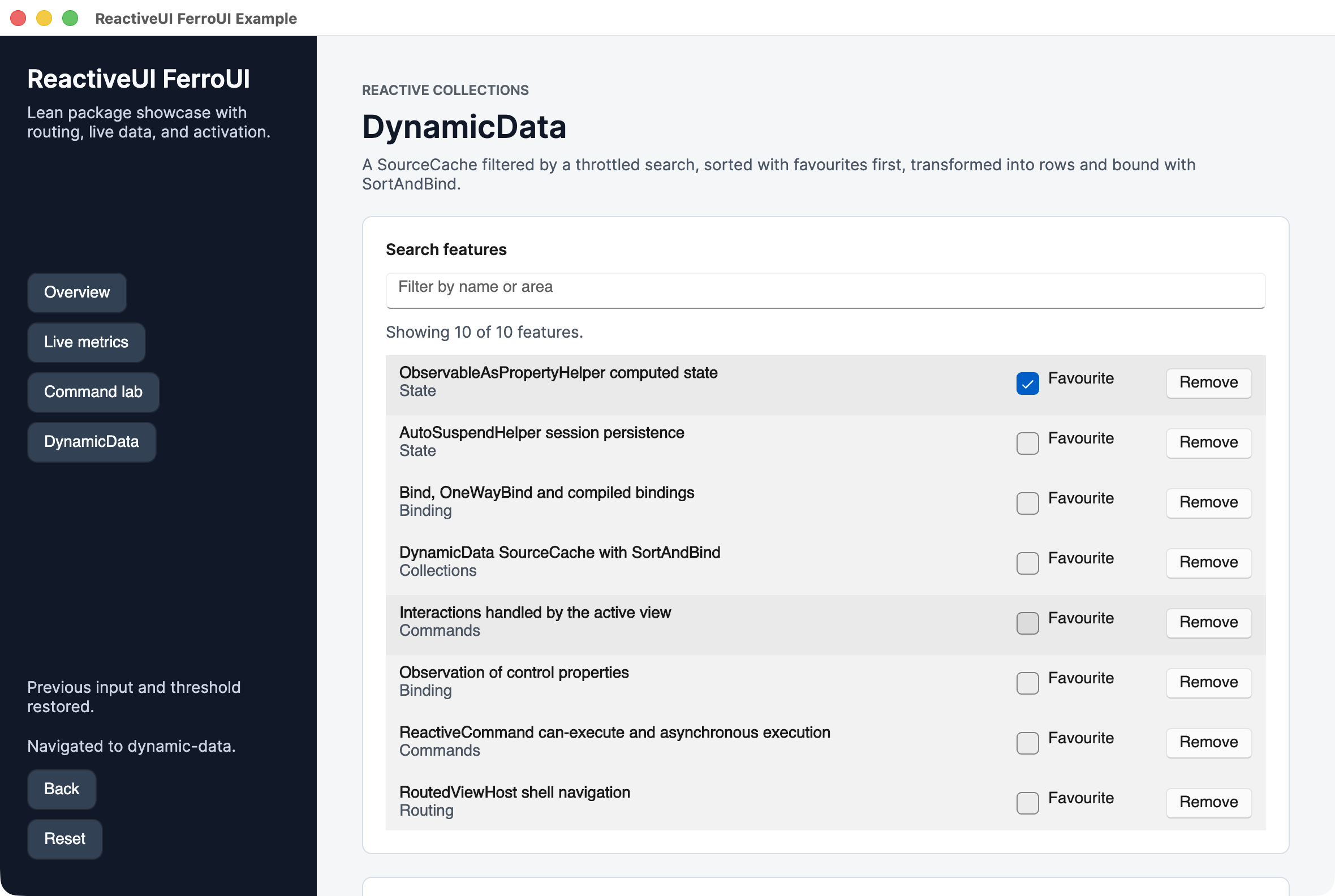
FerroUI has ports of System.Reactive, DynamicData, Splat and ReactiveUI, one crate each, and an integration of ReactiveUI with the controls (ferroui-reactiveui-controls) that is set up with use_reactive_ui on the application builder. Only the integration depends on the user interface, so view models can be tested without a window. The guide docs/mvvm.md covers view models, property paths, commands, views, routing, reactive collections, threading and testing, with the two samples, samples/ReactiveDemo and samples/ReactiveUIExample.
| ReactiveDemo | The DynamicData page of the ReactiveUI example |
|---|---|
 |
 |
Repository layout
The layout follows the upstream project so that files can be compared side by side; the crate of each directory is in the table of crates above.
| Path | Contents |
|---|---|
src |
The crates of the framework, one directory per upstream project (src/FerroUI.Base, src/FerroUI.Controls, src/Markup/..., src/Skia/..., src/Windows/..., ...) |
native/FerroUI.Native |
The Objective-C++ library of the macOS platform |
external/XamlX |
The XAML compiler front end (xamlx) |
samples |
The sample applications: the ControlCatalog with its hosts for the desktop, the browser, iOS and Android, the WinUI gallery, the gallery of the WinUI theme with its comparison against WinUI 3, and the smaller samples |
tests |
Test crates: the XAML suites, the render tests, the leak tests, the benchmarks, the Windows integration tests and the comparison of the render backends |
docs/porting |
The porting guide, the design and verification documents of each platform, and the tracking |
scripts |
Code generators, upstream synchronisation, the status tooling, the release scripts and the build and run scripts of each platform |
Documentation
- Porting guide: the class model, naming and mapping rules, and the conventions every ported file follows.
- Critical path: the state of each subsystem and what is open.
- Tracking and what is left: generated per-file, per-type and per-member status.
- Deviations: every place where the port differs from upstream, and why.
- XAML design: the markup pipeline, the run-time loader and the compiler of markup to Rust.
- MVVM on FerroUI: ReactiveUI, DynamicData and System.Reactive on FerroUI, with the samples ReactiveDemo and ReactiveUIExample.
- Platforms: Windows, WinUI, Linux on X11 with AT-SPI, Wayland, Linux framebuffer, OpenGL on macOS and iOS, iOS, Android, browser with its render worker, headless VNC, Vulkan.
- Rendering: render thread, Vello backend, render tests.
- Releasing: the published crates, the version scheme and the release workflow; changelog.
Contributing
Please open an issue to discuss a change before sending a pull request. Contributions are expected to follow the porting guide: port files one to one with their tests, keep behaviour identical to the reference implementation (or record the difference in DEVIATIONS.md), and keep cargo test --workspace green.
License
FerroUI is licensed under the MIT License.
It is derived from other open source projects, and some files are carried under their original licenses. See NOTICE.md and the component-level notices it refers to for the full attributions and license texts.