
fx0
fx0 is an open-source, lightweight design agent built with libfx. You describe a page and an agent writes it as one HTML file.
fx0 is also a working example of an app built on libfx. One createFxAgent() call gives it the agent loop, streaming, tool calls, retries and durable sessions, and createFxEngine() runs each subagent.
Try it at fx0.vercel.dev, or clone it and make it your own.
Features
- Sign in with Vercel to bill model calls through AI Gateway to your own team.
- Optionally offer five free Opus 5.5 Fast prompts per IP without sign-in or a card. BotID protects the trial; a server-only Gateway key funds its admitted prompts.
- A chat survives the function dying mid-reply: the turn continues where it stopped. See Durability.
- Every turn keeps its version of the design. You can reopen any of them and copy or download the HTML.
- Pick each chat's model, with its reasoning effort and fast mode. New chats start on fast Claude Opus 5.5, or on
FX0_MODELwhen it's set. - The agent can search the web and fetch pages for reference.
- Start from one of ten
design.mdstyles, or upload your own. The ten styles, and the one-line descriptions in the picker, come from VoltAgent's awesome-design-md, which you can browse at getdesign.md. Thanks to VoltAgent for publishing them. - Type a message before you sign in. The draft, images included, waits in the tab for 15 minutes while you sign in.
- A turn stops after 64 model steps, its subagents' included, which keeps an agent stuck in a loop from running up a bill.
- In paid-only chats, a text message sent while the agent works steers it, as in the fx CLI. Trial chats run each input as its own turn so free and paid funding stay separate.
How fx0 uses libfx
fx0 is the app. libfx is the agent inside it. Vercel keeps the agent's work safe while it runs.
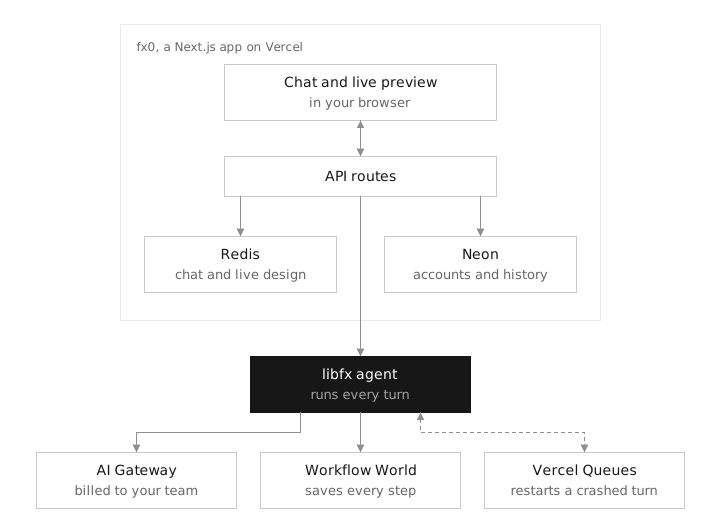
- fx0 owns what you see and what's yours: the chat and live preview, sign-in, the design tools the agent calls, and the chat history in Redis and Neon.
- libfx runs every turn, meaning one message and everything the agent does to answer it: the model loop, tool calls, retries and steering. fx0 creates one agent with
createFxAgent()and passes each chat's messages to it. - Workflow World, the store behind Vercel Workflow, is where libfx saves each turn as it runs: the prompt before it's accepted, then every step.
- Vercel Queues keeps a backup of each prompt. When the function running a turn crashes or reaches its time limit, the queue wakes a new one at
/api/libfx, and libfx continues from the last saved step. - AI Gateway receives every model call. Paid turns use the sender's OAuth token and team; explicitly sponsored turns use the server's trial key.
Durability
fx0 runs one durable libfx agent per server. libfx keeps each chat's conversation as a session and backs every turn with Vercel Queues, so a turn finishes even when the function running it dies. fx0 has no code of its own to recover a turn. Durability takes three pieces.
The agent. fx0 passes no durability option, so createFxAgent() uses libfx's default: on Vercel, libfx keeps its sessions in Vercel's World, the store behind Vercel Workflow, and uses Vercel Queues. libfx bundles both clients, so fx0 neither writes workflows nor calls Vercel Queues itself. A prompt runs its turn in the request that sent it, so the reply starts without a queue hop, and Vercel Queues keeps the prompt as a backstop until just after that request's 800-second limit. fx0 sends a message as a prompt when the chat is idle. One sent while a turn runs or waits to start is a steer instead, which libfx delivers through Vercel Queues to the running turn.
// lib/libfx-agent.ts, simplified
const agent = createFxAgent({
  // No durability option: Vercel's World and Queues on Vercel, local files elsewhere.
  apiKey: 'session-authenticated',
  fetch: chatFetch,
  tools,
})

// lib/agent.ts, simplified: a chat gets a libfx session on its first message,
// and each message is one turn of it
const libfxSessionId = await agent.newSessionId()
const session = agent.session(libfxSessionId, { model, instructions, context: { chatId, turnId } })
session.prompt(`[${author}] ${text}`, { messageId: `m${turnId}` })
The route. Vercel Queues delivers the turns no request runs itself to app/api/libfx: the rest of a turn that outlasted its prompt request, and a prompt's backstop when that request died. libfx's handler runs them:
// app/api/libfx/route.ts
export const maxDuration = 800
export const POST = agent().wakeHandler()
The trigger. One entry in vercel.json subscribes that route to libfx's queue topic:
{
  "functions": {
    "app/api/libfx/route.ts": {
      "experimentalTriggers": [{ "type": "queue/v2beta", "topic": "__libfx_wkf_workflow_session", "retryAfterSeconds": 5 }]
    }
  }
}
fx0 keeps the transcript, designs and settings in Redis. Here is one message from send to reply. The numbers match the steps below:
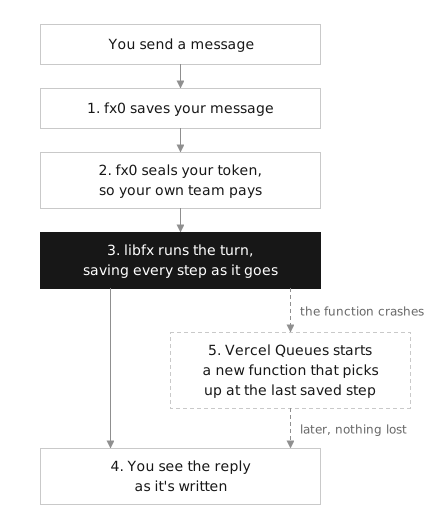
1. Save the message before answering. POST /api/prompt adds the message to the transcript in one Redis script, then hands it to libfx with its message id. libfx stores it before acknowledging, so a message that shows as sent can't be lost, and a retried request reaches the same turn.
2. Keep the turn's funding. A queue delivery has no browser cookie, so the prompt route seals its funding in Redis. Every message records the funding of the turn it starts: either the admitted sponsorship or its paid sender's OAuth grant and team. Fresh SDK diagnostics and the journal's restore hook identify the executing turn after a crash. Refresh tokens stay in the cookie, and the server trial key stays out of every stored credential. Missing or expired trial funding never falls back to a customer's paid grant.
3. libfx runs the turn. One worker holds a session at a time, and libfx fences out any other. The prompt request runs the turn first; it and each delivery to /api/libfx can run for 800 seconds, their maxDuration. libfx stops a turn 30 seconds before that limit, keeping what it has done so far, and a delivery to /api/libfx continues it, so a long turn spans several invocations.
4. Copy the stream into the transcript. Any route following the chat, the prompt's own response or an open tab, copies libfx's stream into the transcript. A cursor check makes each line land once, however many follow. The same Redis script marks a turn running when its start lands, and when its end lands it leaves the turn's history to write, with the design the turn left. The copy then writes that history and design version to Neon, and a write that fails waits in Redis for the next copy to retry.
5. Pick up where it stopped. On Vercel, libfx can't tell a crashed function from a slow one, so the request running a turn holds its session until its time limit. The prompt's backstop comes due 5 seconds after that limit: if the request died, the backstop takes the session over and the turn continues where its records end. In a delivery to /api/libfx, a process that exits has its delivery run again about a second later, and a function that stops without exiting holds its message until the queue's hold runs out, up to five minutes. The model is told the turn was interrupted, so it can check what happened before going on. A function that only stalled and wakes after that stops at its next write, so two never write at once.
A tool call the crash cut off runs again only if it's safe to repeat. libfx refuses a tool that doesn't say which it is, and fx0 marks its tools in lib/libfx-agent.ts: reading the design, publishing it, fetching a page, paging through a tool result and searching the tools run again. Edits, questions and subagents don't, so the model is told those calls may have run and decides what to do. The reads start as soon as the model asks for them, while libfx saves the call.
A subagent is an in-memory createFxEngine() inside its tool call, billed to the same chat. It has the same design tools, except that it can't start a subagent of its own. Its model requests count toward the parent turn's 64 steps, in a count kept in Redis (lib/turn-budget.ts), so subagents can't multiply what one turn spends. A retried or recovered request counts once.
TL;DR:
- A crash delays the reply, by up to about 13 minutes, but never loses the chat or the reply in progress.
- The turn continues instead of starting over, so finished model calls aren't paid for twice.
- Each turn keeps its authorized funding after a crash too.
You can watch this happen. Open session diagnostics from the header to see the chat's libfx session, its running turn and how far the transcript has copied libfx's stream.
Limits
- If a prompt request crashes while it runs its turn, for example by running out of memory, the turn continues about 13 minutes after the send, however early the crash came. On Vercel, libfx can't tell a crashed function from a slow one, so a crashed request still holds the session until its 800-second limit, and the prompt's backstop takes over 5 seconds later. The page keeps showing the reply as running meanwhile. A turn that only runs long isn't affected: libfx stops it 30 seconds before the limit and queues the rest at once for a delivery to
/api/libfx. - A text message sent while a tool runs, such as while a design is being written, waits for that tool before the model sees it. A message with images runs as its own turn, after any running turn finishes.
- Every turn bills the login and team that sent the message that started it; a later message cannot change an earlier turn's funding. A text message that joins a running turn is billed to that turn. Token renewal from the same login keeps the turn's billing team.
- Free prompts start in a new design on Opus 5.5 Fast with low effort. Existing paid-only chats keep their own billing. The allowance is five per IP across chats and browsers, with no periodic refill; clearing cookies does not reset it. After it is used, sign in to continue with your own team.
- A design being written streams through a bounded, expiring Redis channel, so viewers on other instances can see it too. Reconnecting resumes from the full prefix; generation IDs and offsets prevent duplicated bytes. The provisional preview strips active markup and runs without scripts. Publishing or ending a turn closes its draft before it can replace the finished preview.
- Deleting a chat removes fx0's records and credential. libfx's session data expires with the World's retention.
- When no route follows a chat, its transcript catches up the next time someone opens it.
- Transcripts are never trimmed, so very long chats get slower to open.
Where things are
| Path | What's there |
|---|---|
lib/agent.ts |
Each chat's prompts, questions, cancel, deletion and sign-out |
lib/libfx-agent.ts |
The durable agent, its per-chat fetch and its tools |
lib/projector.ts |
Copies a chat's libfx stream into its transcript |
lib/turn-credential.ts |
The sealed credential each chat's turns bill |
lib/trial.ts |
Guest identities and the atomic per-IP trial allowance |
lib/journal.ts |
The Redis journal. Every write is a single Lua script, so it's atomic. |
app/api/libfx/ |
Where Vercel Queues delivers libfx's turns |
lib/tools.ts |
The agent's tools: read, publish and edit the design, fetch a URL, ask a question, page through a long tool result, search the available tools and start a subagent. AI Gateway's web search runs beside them. |
lib/design-artifact.ts |
Checks that a design is one HTML file of at most 512 KB, with no external assets |
app/api/ |
Route handlers. Chat routes check sign-in and ownership before anything else. |
components/ |
The chat, composer, preview and diagnostics panel |
Neon Postgres holds accounts, who owns each chat, finished turns and every design version (migrations/).
Run it locally
You'll need Node.js 24 and three services:
- A Sign in with Vercel app with the scopes
openid profile email offline_accessand the permissions AI Gateway: Use and Team: Read Only. Addhttp://localhost:3000/api/auth/callbackas a callback URL. Don't leave outoffline_access: without it, Vercel sends no refresh token and sign-in fails. - A Neon Postgres database. Use a separate branch for local work.
- An Upstash Redis database.
Copy .env.example to .env.local and fill it in. SESSION_SECRET has to be a random string of at least 32 characters. If your local app shares Redis with a deployment, set FX0_REDIS_PREFIX (for example fx0:local) to keep the chats apart. FX0_MODEL changes the model new chats start on.
npm ci
npm run db:migrate
npm run dev
db:migrate applies the files in migrations/ in order. Each one is idempotent, so running it twice is fine. The app never migrates on its own.
Deploy
Set the same variables on Vercel. The Neon and Upstash integrations in the Vercel Marketplace fill in DATABASE_URL, KV_REST_API_URL and KV_REST_API_TOKEN for you. Set APP_URL to your production URL and add <APP_URL>/api/auth/callback to your Sign in with Vercel app.
OAuth redirects never trust the request's Host header. They go to APP_URL, or, on a preview deployment without one, to that deployment's own Vercel URLs.
To enable the free trial, apply the migrations, set FX0_FREE_PROMPTS=1 and a server-only AI_GATEWAY_API_KEY, then rebuild and deploy. BotID's client protection and server verification are included. Production uses Vercel's trusted client IP; local development shares one local allowance. Keep local Redis prefixes separate from production.
Test
npm run typecheck                 # generates the route types, then runs tsc
npm run test:core
npm run test:auth
npm run build
npm run test:smoke                # runs the production build with fake sessions
npm run test:journal:integration  # needs KV_REST_API_URL/TOKEN, writes under its own prefix
npm run test:trial:integration    # needs local redis-server/redis-cli; no remote services
npm run test:artifact:browser     # needs local Chrome (or CHROME_PATH); checks design CSP enforcement
npm run test:budget:integration   # needs local redis-server/redis-cli; no remote services
npm run test:turns:integration    # needs local redis-server/redis-cli; no remote services
The auth and route tests mock Vercel, AI Gateway and both databases, so check a real sign-in and real billing on a deployment.
Safety
Generated pages run in a sandboxed iframe on an opaque origin. They can't read the app's cookies, storage or credentials, and their Content Security Policy blocks network requests (connect-src 'none'). It's still the browser enforcing all of this, though, not a sealed VM.
Paid model requests carry the sender's OAuth token only to AI Gateway. Between requests it stays sealed in Redis and expires with the token. Sponsored requests require a recorded trial admission; the server key is never sent to a browser, cookie, journal or model prompt. Signing out deletes that login's stored credentials and revokes its token. A running turn it funded stops at its next model request; another login's turns keep running. Treat the session cookie and SESSION_SECRET as credentials.
License
Apache-2.0. The design.md styles in lib/design-md/ come from VoltAgent/awesome-design-md, under the MIT license.